
If you need to contact us you can do so on our contact page here
Here is a video walking you through the different ways to easily and fully uninstall the freecouponsearcher Extension
Option 1
From the Menu bar Right click on the freecouponsearcher Icon and select Remove From Chrome
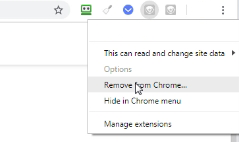
Wait a few seconds and you will be asked to confirm. You confirm you want to remove the extension by selecting Remove.
Option 2
Navigate to the dialog box, Select More Tools – Extensions
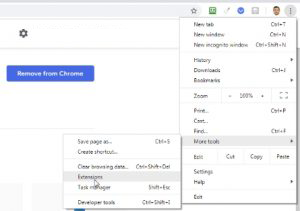
Locate freecouponsearcher and select Remove

Wait a few seconds and you will be asked to confirm. You confirm you want to remove the extension by selecting Remove.
If you change your mind you can always find the freecouponsearcher Extension again in the Chrome store and install the extension as normal.